
Unearthing DOM XSS
Today, we're on a quest to uncover the mysteries of DOM XSS. Alright, let's break it down. DOM XSS stands for "Document Object Model Cross-Site Scripting" – a fancy way of saying that hackers can sneak bad code into your website. It's like inviting troublemakers to your party without knowing it. They mess with your website's brain (the DOM), and suddenly, your site is doing things it shouldn't. DOM XSS (Document Object Model Cross-Site Scripting) occurs entirely on the browser side. It is a type of cross-site scripting vulnerability that involves manipulating the Document Object Model (DOM) of a web page using malicious input, resulting in unauthorized script execution within the user's browser environment.
What is the DOM?
The Document Object Model (DOM) is a programming interface provided by web browsers that allows developers to interact with the structure, content, and style of HTML and XML documents. In simpler terms, it's a way to represent a web page in a structured, accessible, and programmable manner, so that scripts and programming languages (like JavaScript) can manipulate and interact with the content of the web page.
How Does the DOM Work?
When you load a web page in a browser, the browser processes the HTML and creates a structured representation of the page in memory. This structured representation is what we refer to as the DOM. The DOM tree is a hierarchical structure where each element, attribute, and piece of content is represented as an object.
Let's break down how this works with an example:
Suppose you have the following simple HTML code:
<!DOCTYPE html>
<html>
<head>
    <title>DOM Example</title>
</head>
<body>
    <h1>Hello, Jubaer!</h1>
    <p>This is something.</p>
</body>
</html>
DOM Representation:
Document
  |
  |-- <html>
      |
      |-- <head>
      |    |
      |    |-- <title>DOM Example</title>
      |
      |-- <body>
          |
          |-- <h1>Hello, Jubaer!</h1>
          |
          |-- <p>This is something.</p>
In this representation, the Document is the top-level object, and it contains the html element, which contains the head and body elements. The body element contains the h1 and p elements.
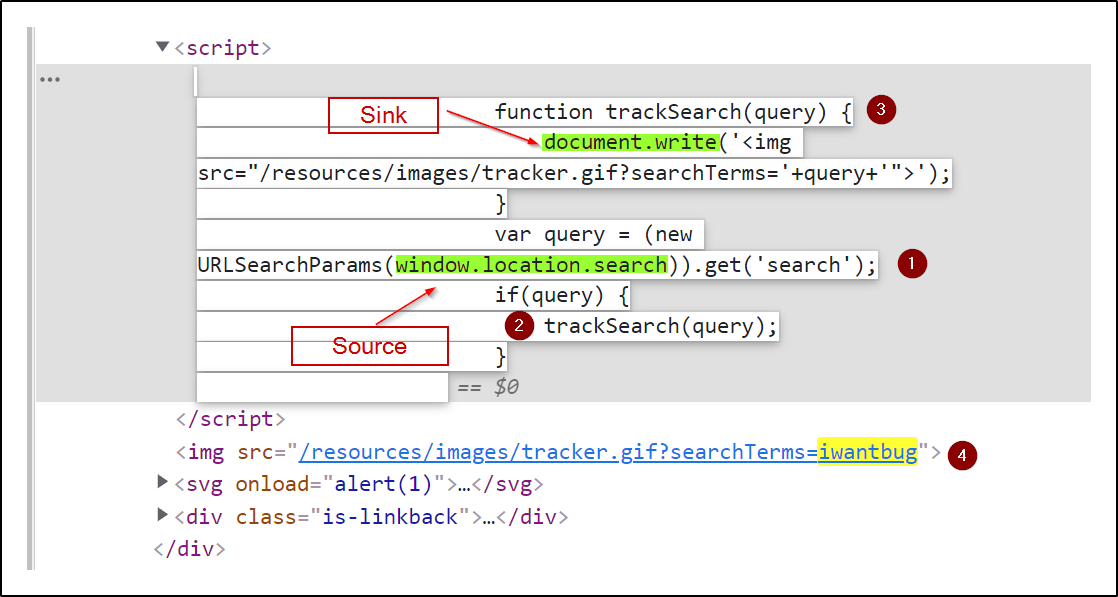
Here's an in-depth look into the DOM and how payloads go through it
Popular Vulnerable DOM Sinks
From PortSwigger:
The following are some of the main sinks that can lead to DOM-XSS vulnerabilities:
document.write()
document.writeln()
document.domain
element.innerHTML
element.outerHTML
element.insertAdjacentHTML
element.onevent
The following jQuery functions are also sinks that can lead to DOM-XSS vulnerabilities:
add()
after()
append()
animate()
insertAfter()
insertBefore()
before()
html()
prepend()
replaceAll()
replaceWith()
wrap()
wrapInner()
wrapAll()
has()
constructor()
init()
index()
jQuery.parseHTML()
$.parseHTML()
The Mischief of document.write()
Imagine someone building a cool site with a guestbook. People can leave messages, and you're using document.write() to show them. But wait! If someone slips in a sneaky script in their message, their site becomes a puppet, dancing to their malicious tune. That's document.write() for you – like letting a masked stranger into your home.
It can be misused to inject arbitrary content into the current document, potentially leading to DOM manipulation and script execution vulnerabilities.
var userInput = "<script>alert('XSS');</script>";
document.write(userInput);
Mitigation:
- Avoid using
document.write()anddocument.writeln()for dynamically inserting user-generated content. - Use DOM manipulation methods to add content safely to the DOM, such as
textContent,innerHTML, or creating elements withcreateElement().
The element.innerHTML Trap
Now, say you're creating a blog platform. Readers can leave comments, and you're using element.innerHTML to show them. But if a prankster leaves a comment with a mean script, your website goes haywire! The comments section becomes a hideout for evil scripts, waiting to pop up unexpectedly.
Manipulating these properties directly with unsanitized user input can lead to DOM-based XSS vulnerabilities.
var userInput = "<img src=x onerror=alert('XSS')>";
element.innerHTML = userInput;
Mitigation:
- Avoid using
innerHTMLandouterHTMLwith untrusted input. - Use DOM manipulation methods to create and insert elements with appropriate attributes.
Beware of $.parseHTML()
Here comes our friend jQuery, the web superhero. But even heroes have flaws, like $.parseHTML(). It's like your buddy trying to help you build a sandcastle, but unknowingly using wet sand. When you insert unsanitized content, it's like putting a secret tunnel in your sandcastle – hackers can sneak in and take control.
Example Code:
var userInput = "<script>alert('XSS');</script>";
var parsedHTML = $.parseHTML(userInput);
$(element).append(parsedHTML);
The Puppeteer – element.onevent
Alright, picture this: your website has buttons that do fun things when clicked. You use element.onevent to make the magic happen. But if a trickster changes those buttons to unleash chaos, it's like your website turned into a mischievous puppet! Every click can lead to unexpected results.
The Marvelous Mystery of constructor()
Say hello to the constructor() – a secret identity of every object in JavaScript. It's like every object's birth certificate. But in the wrong hands, it's like giving a thief a master key to your home. They can build stuff that looks innocent but hides a nasty surprise.
The Bridge of postMessage
Using the postMessage API in JavaScript can also introduce security vulnerabilities, including potential cross-site scripting (XSS) risks. postMessage is a method that enables communication between different windows or frames in a web page, even if they originate from different domains. While postMessage itself isn't inherently dangerous, its misuse can lead to security issues, including DOM-based XSS.
Here's an example of how misuse of the postMessage API can lead to a DOM-based XSS vulnerability:
Scenario: Imagine a website with two frames: a parent frame and a child frame. The parent frame contains user-controlled content, and the child frame expects to receive and display a message using the postMessage API.
User Input
- The parent frame allows users to enter text that will be displayed in the child frame.
- A user named Mallory enters the following text:
<script>parent.postMessage('Hi there!', '*');</script>.
Post Message Communication
- The parent frame uses the
postMessageAPI to send the user's input to the child frame. - The child frame listens for incoming messages and displays the content received from the parent frame.
Malicious Script Execution
- The child frame receives the message from the parent frame and dynamically inserts it into its DOM.
- Since Mallory's input contains a script tag, the browser's DOM parser interprets it as HTML and executes the script within it.
- The script
parent.postMessage('Hi there!', '*');gets executed, sending the message "Hello from Mallory!" to all frames in the window, including the parent frame.
Mitigation: To prevent misuse of the postMessage API and related vulnerabilities:
- Validate and Sanitize: Validate and sanitize any user input before using it in the
postMessageAPI. Avoid sending untrusted or unsanitized content throughpostMessage. - Origin Validation: Implement origin validation when using
postMessage. Only accept messages from specific origins that you trust. This helps prevent unauthorized communication. - Limit Scope: If possible, restrict the scope of the communication to only necessary windows or frames, rather than using a wildcard (
'*') for all origins. - Escape and Encode: When dynamically inserting received messages into the DOM, escape and encode the content appropriately to prevent any potential script execution.